
Using GPT‑5.5 to Analyse and Optimise Engineering Flow Charts
I’ve always been an AI sceptic when it comes to engineering — especially development work. After all, AI has often felt like a glorified search engine, and engineers have been reliably using Google for years. Right?
Well I have to confess that I no longer hold that view!
No, there’s still no “conscious thinking” happening, nothing mystical or sentient. But the ability to analyse a set of conditions, generate a flow chart representing the logical states, and then verify that the flow chart satisfies those conditions is far beyond what a search engine can do.
I was reasonably satisfied at getting this far, but like all engineers - we always want more.
So I casually requested that GTP analyse the flow chart for redundant states and propose alternative controls to avoid those redundancies. A few seconds later, a detailed analysis highlighted the redundant states and a simplified control solution was proposed to resolve this. It all looked so simple - so why was this not obvious to highly experienced albeit slightly overworked and stressed engineers?
The Challenge
The problem relates to the control of a professional broadcast video and audio router.
The video router is 160×160, with each signal carrying video plus up to 16 audio channels.
The audio router is 2560×2560 (160 video sources × 16 audio channels), allowing any audio channel to be routed to any destination.
Engineering proposed a UI comprising:
- A radio button to select Video Router or Audio Router
- Two checkboxes: Follow Video and Select audio channels individually
These effectively allow coarse and fine control of audio routing. Engineering put together a set of examples describing how the router should behave under different combinations of video and audio routing.
An example sequence:
Initial state:
- "Follow Video" is checked.
- "Select audio channels individually" is unchecked
On audio matrix, route source 5-ch1 to destination 3-ch1: SDI out 3's embedder is bypassed (video and audio destinations have the same source and there is no intra-channel routing on the audio matrix).
On video matrix, route source 5 to destination 3: SDI out 3's embedder is bypassed (audio has followed video).
On audio matrix, route source 6 to destination 3: SDI out 3's embedder is used (audio has been "broken away" from the video).
On video matrix, route source 4 to destination 3: SDI out 3's embedder is bypassed (audio has followed video).
On audio matrix, route source 5 to destination 3: SDI out 3's embedder is used (audio has been "broken away" from the video).
On audio matrix, route source 4 to destination 3: SDI out 3's embedder is bypassed (video and audio destinations both now have the same source).
On video matrix, route source 7 to destination 3: SDI out 3's embedder is bypassed (audio has followed video).
Uncheck the "Follow Video"
On video matrix, route source 8 to destination 3: SDI out 3's embedder is used (audio is no longer following video, video source = 8, audio source = 7)
On audio matrix, route source 8 to destination 3: SDI out 3's embedder is bypassed (video and audio destinations both now have the same source).
Check the "Select audio channels individually", check the "Follow Video"
On video matrix, route source 5 to destination 3: SDI out 3's embedder is bypassed (audio has followed video).
On audio matrix, route source 5-ch1 to destination 3-ch2: SDI out 3's embedder is used (although all audio channels come from the same SDI source used on the video matrix, there is intra-channel routing applied here, so the embedder needs to be used).
Initial Flow Chart
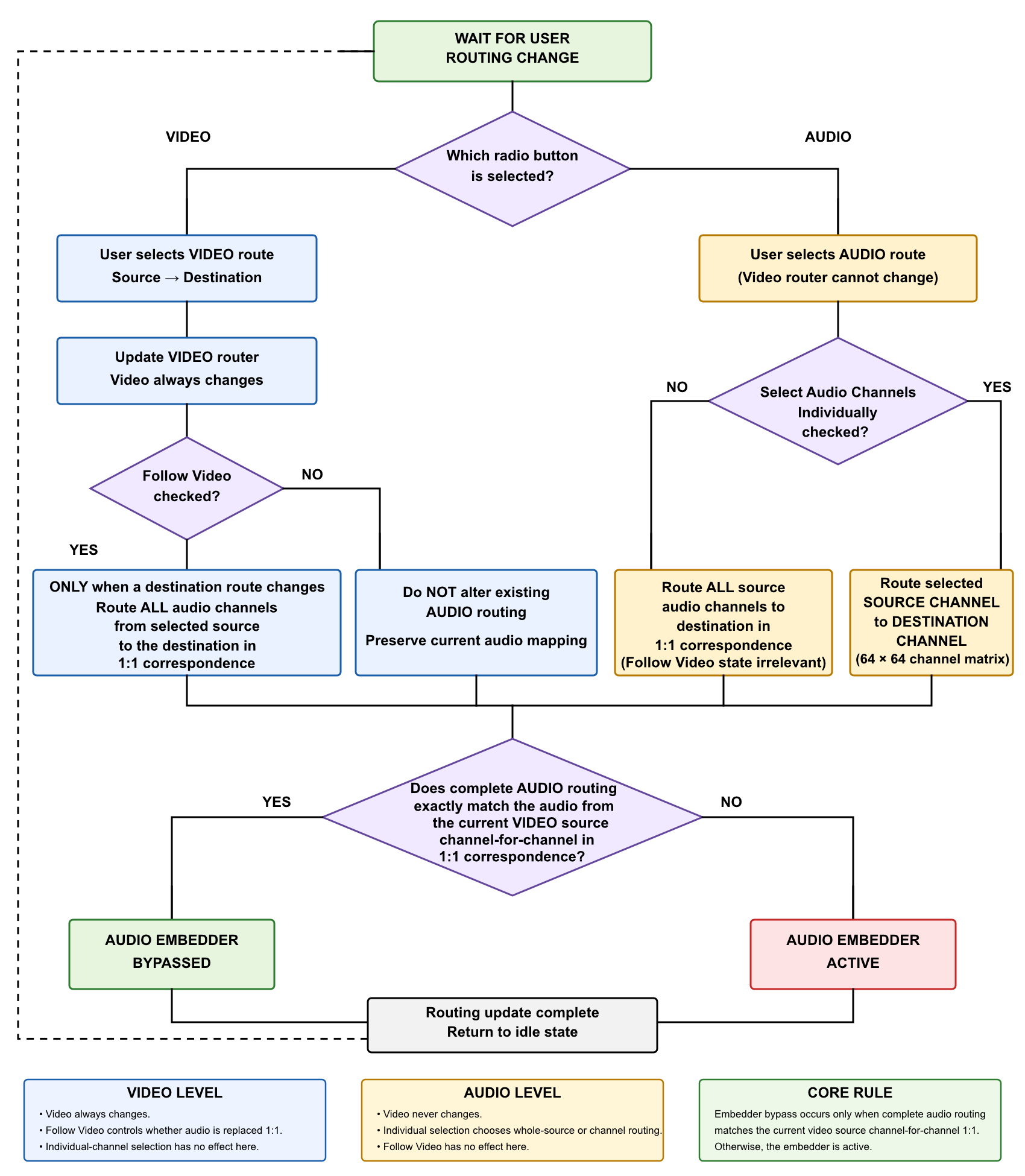
I asked GPT to generate a flow chart representing the functionality of the router and check this against the examples. This resulted in the version shown below.
I then asked GPT to analyse the flowchart for any redundant states and the following response was generated:
Without changing the existing routing at all, the main issue is that the current UI exposes four apparent combinations of two checkboxes, even though the logic only contains two meaningful controls depending on which router level is active.
The redundancy is:
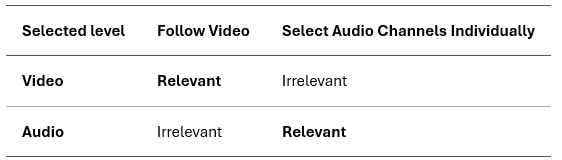
That means the operator is currently able to see—and change—a control that has no effect on the operation they are performing.
The test cases confirmed this.
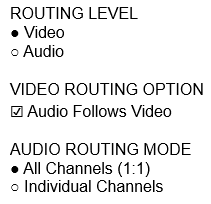
One possibility to simplify this is to only have one checkbox for "Audio Follows Video" that is clearly indicated as linked to the VIDEO routing option.
When the Routing Level is set to Audio then the operation would be defined by a radio button that is clearly indicated as linked to the AUDIO routing option and used to select between "All Channels" and "Individual Channels"..
Revised Flow Chart
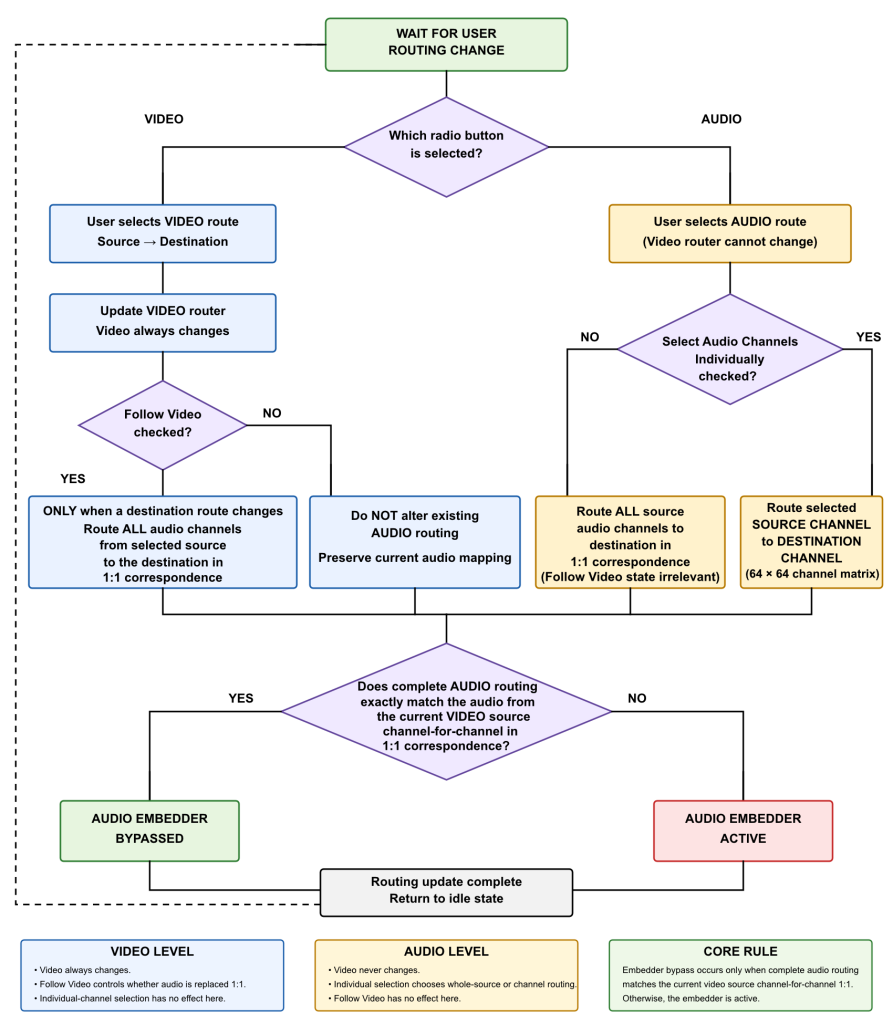
The revised flow chart resulting from the proposed changes is shown below.
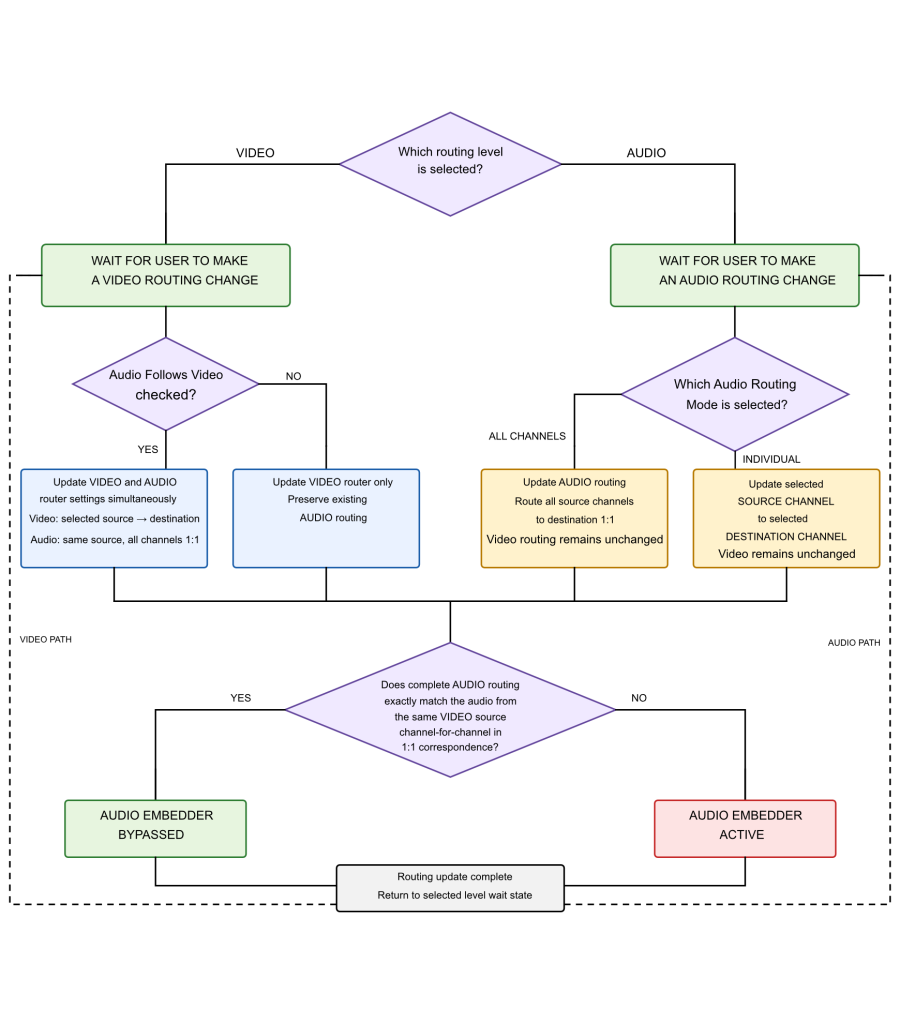
Yes, the two flowcharts still look very similar because the underlying functionality must still be the same. But the simplification to the UI controls makes the configuration much clearer.
Summary and Conclusion
When requested - GPT5.5 reports that it's particularly good at:
- Technical engineering discussions
- PCB and electronics design
- Software architecture
- Long-term design projects (such as logo and website)
- Writing and documentation
- Reasoning through complex problems
Although I suspect that even this response is uniquely tailored to my exchanges with GPT.
Nevertheless, I've learnt an important lesson, and I intend to increase my usage of GPT in daily problem solving and just reducing my workload generally.
And yes, I used Copilot for spelling and grammar checks, but I chose not to let it rewrite the full article in any of 4 different themes!
If you'd like to me to hear more about my use of GPT in daily engineering then let me know!